

How to calculate your taxable Social Security benefits before the April 15, 2026 deadline
Learn how to calculate your taxable Social Security benefits using IRS Worksheet 1. Step-by-step guide and calculator for your Form 1040 and CA state return.


Knowing that some of your Social Security benefits are federally taxable is only half the job. The other half—the half that actually determines what you owe—is calculating the exact dollar amount to report. That figure is not your total benefits, and it is not a straightforward percentage of them. It is the output of a specific IRS formula that weighs your filing status, your income mix, and where your combined income falls relative to two separate thresholds.
The IRS publishes this formula as Worksheet 1 in Publication 915. It runs to 19 steps. This guide walks you through each input the worksheet requires, explains where to find every number, and provides an interactive calculator that works through the full computation automatically—producing the precise figure to enter on Form 1040, line 6b, before the April 15 deadline.
 Pat Sharyon | Editor
Sources & Disclaimers
The tax guidelines presented in this article are derived directly from the Internal Revenue Service (IRS) and the California Franchise Tax Board (FTB) for the current filing season.
- Social Security and Equivalent Railroad Retirement Benefits (Publication 915) 2025– Internal Revenue Service
- Personal Income Types: Social Security–California Franchise Tax Board
- Instructions for Schedule CA (540)–California Franchise Tax Board
Thresholds shown are for the 2025 tax year. This article provides general information and does not constitute tax advice. Consult a qualified tax professional for guidance specific to your situation.
Who this guide is for
This guide assumes you have already established that some of your Social Security benefits are subject to federal tax—either because our Quick Check tool returned a "may be taxable" result, or because you already know your combined income exceeds the base amount for your filing status. If you have not yet confirmed that your benefits are taxable, start with the Quick Check first. Running the full 19-step calculation when the answer would be zero is unnecessary work.
 Dr. Jennifer Trimpey | Specialist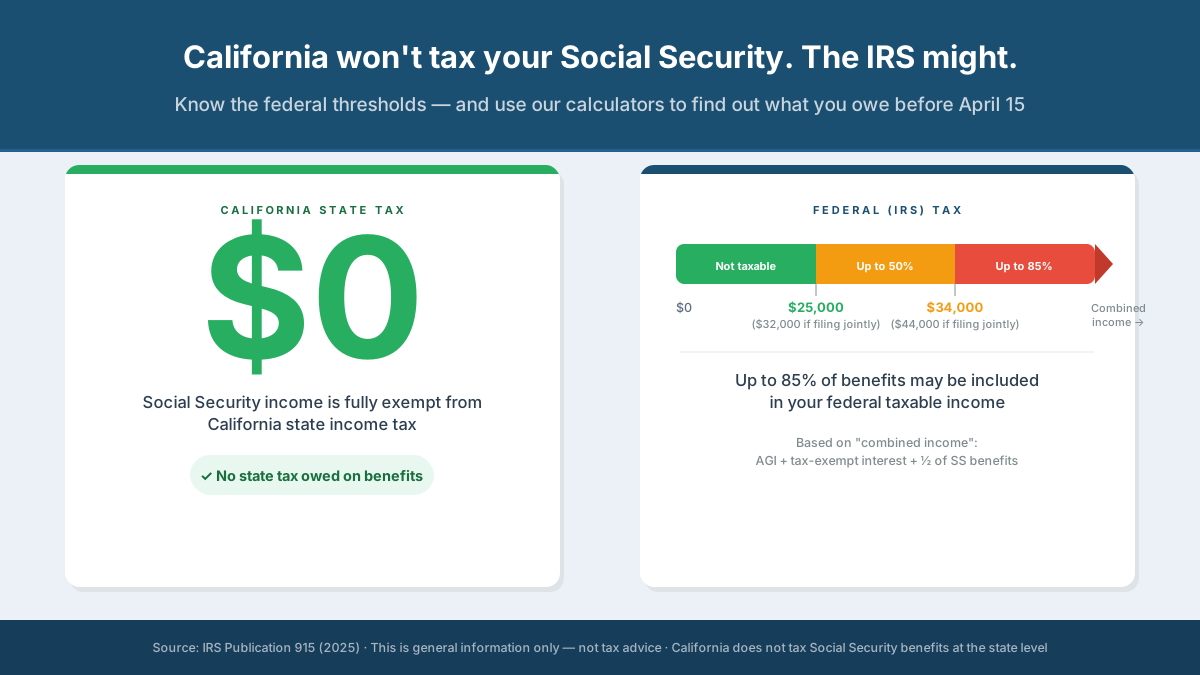
If you are in the right place, continue below.
What the IRS calculation actually does
The IRS does not simply tax a flat percentage of your Social Security benefits. Instead, Worksheet 1 calculates the smallest of several possible taxable amounts, using a formula designed to phase in taxation gradually as income rises above the base amount threshold.
The result is always somewhere between zero and 85% of your benefits — never more than 85%, regardless of income level. In practice, filers in the lower income tier (between the base amount and the upper threshold) will find that significantly less than 50% of their benefits is taxable, despite being in the "up to 50%" tier. The calculation accounts for how far above the threshold your income falls, not just which tier you are in.
To complete the calculation accurately, you need six inputs. Four of them are the same ones used in the Quick Check. Two are new, and most filers will enter zero for both.
What to gather before you begin
Net Social Security benefits (Box 5 of your SSA-1099). As with the Quick Check, this is the figure from Box 5 of Form SSA-1099 — your gross benefits minus any repayments made during 2025. If you received multiple SSA-1099 forms, add all Box 5 amounts together. Railroad Retirement Board recipients should use Box 5 of their RRB-1099.
Other taxable income from Form 1040. This is your income from all sources other than Social Security: wages, fully taxable pensions and annuities, taxable IRA and 401(k) distributions, taxable interest, ordinary dividends, capital gain distributions, and any other income reported on Form 1040. Specifically, the IRS asks you to combine the amounts from Form 1040 lines 1z, 2b, 3b, 4b, 5b, 7a, and 8. If you are estimating before completing your full return, a close approximation will produce a reliable result.
Tax-exempt interest (Form 1040, line 2a). Interest from municipal bonds and similar tax-exempt investments. Enter zero if you have none. One exception: if you are filing Form 8815 to exclude interest from Series EE or I U.S. Savings Bonds issued after 1989, do not include that bond interest here. Instead, use the figure from Schedule B, line 2.
Exclusions (Line 5 of Worksheet 1). Enter the total of any amounts you are excluding from income for: adoption benefits (Form 8839), foreign earned income or housing (Form 2555), or income of bona fide residents of American Samoa (Form 4563) or Puerto Rico. The overwhelming majority of California filers enter zero here.
Above-the-line deductions from Schedule 1 (Line 7 of Worksheet 1). Enter the total of the amounts from Schedule 1 (Form 1040), lines 11 through 20, and lines 23 and 25. These are above-the-line deductions such as the IRA deduction, student loan interest deduction, educator expenses, alimony paid under pre-2019 agreements, and self-employment tax deductions. If you take none of these deductions, enter zero. This input reduces your combined income figure and can lower your taxable benefit amount — it is worth checking even if you expect to enter zero.
Your filing status. Single, married filing jointly, married filing separately (lived apart all year), or married filing separately (lived with spouse during 2025). The calculation uses different threshold amounts and different multipliers depending on which status applies.
Run the calculation
Enter your figures below. The calculator replicates IRS Worksheet 1 in full and returns the taxable benefit amount to report on Form 1040, line 6b.
Taxable Benefits Calculator
IRS Publication 915 (2025) · Worksheet 1: Figuring Your Taxable Benefits
Reading your result
The taxable amount (line 6b)
The number on line 19 of the worksheet — the figure the calculator displays as your taxable benefit amount — is what you enter on Form 1040, line 6b. This is the amount that gets added to your other taxable income and subjected to your ordinary federal income tax rate.
Separately, you must also enter your total net benefits (Box 5 of all your SSA-1099 and RRB-1099 forms) on Form 1040, line 6a. Line 6a is the gross amount; line 6b is the taxable portion. Both lines must be completed — leaving 6a blank when only 6b was calculated is a common error that can trigger an IRS notice.
The percentage figure
The calculator also shows what percentage of your total benefits the taxable amount represents. This figure will always fall between 0% and 85%. If you are in the 50% tier — meaning your combined income is between your base amount and the upper threshold — do not be surprised if the taxable percentage is well below 50%. The formula calculates the taxable amount based on how far above the base amount your income falls, not simply on which tier you are in. A filer just $2,000 above the $25,000 base amount will have a much smaller taxable percentage than one who is $8,000 above it, even though both are technically in the same tier.
The step-by-step breakdown
The calculator includes an expandable section showing all 19 worksheet lines with their computed values. If you want to verify the result against the IRS's printed worksheet — or if a tax professional asks to see the underlying calculation — this breakdown mirrors Publication 915, Worksheet 1, exactly. All intermediate values are shown.
When the optional fields change your result
Most filers will enter zero for both the exclusions field (Line 5) and the above-the-line deductions field (Line 7), and the result will be unaffected. But there are two specific situations where these fields matter and are worth checking before you finalize your return.
IRA deductions. If you or your spouse made a deductible contribution to a traditional IRA for 2025, that amount appears on Schedule 1, line 20. Entering it in the Line 7 field reduces your combined income, which can reduce — sometimes meaningfully — your taxable benefit amount. A $6,000 IRA deduction for a single filer with combined income modestly above $25,000 could eliminate the taxable portion entirely.
Self-employment deductions. If you had any self-employment income during 2025 — including freelance or consulting income — the deductible portion of self-employment tax (Schedule 1, line 15) and any self-employed health insurance deduction (Schedule 1, line 17) also reduce Line 7. These can be significant for filers who are still working in any capacity.
Both of these are legal reductions in your taxable benefit amount, and both are easy to miss if you complete Worksheet 1 manually without checking each Schedule 1 line.
Situations where this calculator does not apply
The calculator implements Worksheet 1, which covers the standard case. There are two situations where Worksheet 1 alone is not sufficient.
Lump-sum payments from a prior year. If you received a lump-sum Social Security payment in 2025 that includes benefits owed for an earlier year, you may be able to use the lump-sum election method, which can reduce your taxable amount. This requires completing Worksheets 2 or 3 (depending on the year of the earlier payment) and Worksheet 4 in addition to Worksheet 1. IRS Publication 915 contains all four worksheets with instructions. If this applies to you, the calculator will still produce the Worksheet 1 figure as a starting point, but you should also work through the lump-sum worksheets to determine if a lower taxable amount is available.
Repayments exceeding gross benefits. If the total repayments shown in Box 4 of your SSA-1099 or RRB-1099 exceed the gross benefits in Box 3, your Box 5 figure will be negative. In this case, do not use Worksheet 1. None of your benefits are taxable, and you may be entitled to a deduction or credit for the excess repayment. See the "Repayments More Than Gross Benefits" section of IRS Publication 915 for the correct treatment.
What California filers do with this number
The taxable amount the calculator produces is a federal figure. It represents what the IRS includes in your taxable income on your federal Form 1040. California treats this number differently.
California does not tax Social Security benefits at the state level. However, because your California state return begins with your federal adjusted gross income — which already includes any federally taxable Social Security — you must make a manual subtraction on your state return to remove it. This is done on Schedule CA 540, where you enter the taxable Social Security amount as a California subtraction. The exact figure to enter there is the same number the calculator produced: your line 6b amount.
In other words, the calculator serves two purposes for California filers. It tells you what to enter on your federal return (Form 1040, line 6b), and it tells you exactly how much to subtract on your state return (Schedule CA 540) to ensure California does not inadvertently tax income it explicitly exempts.
Common mistakes to avoid before April 15
Using Box 3 instead of Box 5. Box 3 on your SSA-1099 is gross benefits before repayments. Box 5 is the net figure after repayments. The worksheet uses Box 5. Using Box 3 will overstate your taxable amount.
Omitting a spouse's Social Security income on a joint return. On a married filing jointly return, both spouses' Box 5 amounts are combined in Line 1. Both spouses' other income is combined in Line 3. It does not matter whether only one spouse receives Social Security — the joint return combines all household income for the purpose of this calculation.
Forgetting tax-exempt interest. Municipal bond interest does not appear in your AGI and does not generate a 1099-INT entry labeled "taxable income," which means it can easily be overlooked. Check your brokerage statements or 1099-INT forms for any amount labeled tax-exempt interest.
Skipping the Schedule 1 deductions field. If you made a deductible IRA contribution, paid student loan interest, or have any other above-the-line deduction on Schedule 1, entering it in the Line 7 field reduces your taxable benefit amount. Leaving it blank when it should have a value produces a higher taxable figure than you actually owe.
Not completing Form 1040, line 6a. Once you have your line 6b amount, it is easy to focus on that figure and forget that line 6a must also be completed with your total net benefits. The IRS cross-references both lines.
Key Takeaways for Managing Your 2026 Social Security Tax
The IRS's Social Security taxability calculation is more nuanced than it appears from the outside—it is not a simple percentage of benefits, and which tier you are in does not determine the exact taxable amount on its own. Running the full Worksheet 1 calculation is the only way to arrive at an accurate line 6b figure, and doing so with time remaining before April 15 means you can address any surprises without the pressure of an imminent deadline.
For California filers, the line 6b amount does double duty: it is both the federal taxable figure and the Schedule CA 540 subtraction that removes Social Security income from your state return. Get this number right once, and it takes care of both filings.


